

Use folders in the Digital Asset Management module to give users a bank of pre-approved images to choose from when personalizing marketing materials. DAM folders can be used as variable data sources for image variables on soft proof projects. This means instead of an end user needing to upload images from their local machines when proofing, they can just choose images from a specified folder on the DAM.
Benefits to the Client
- Streamline the process for end users to
customize marketing materials with images - Give users a bank of options for images to use when
proofing instead of uploading - Upload new images to the linked DAM folder to
update the image bank for proofing
How It Works
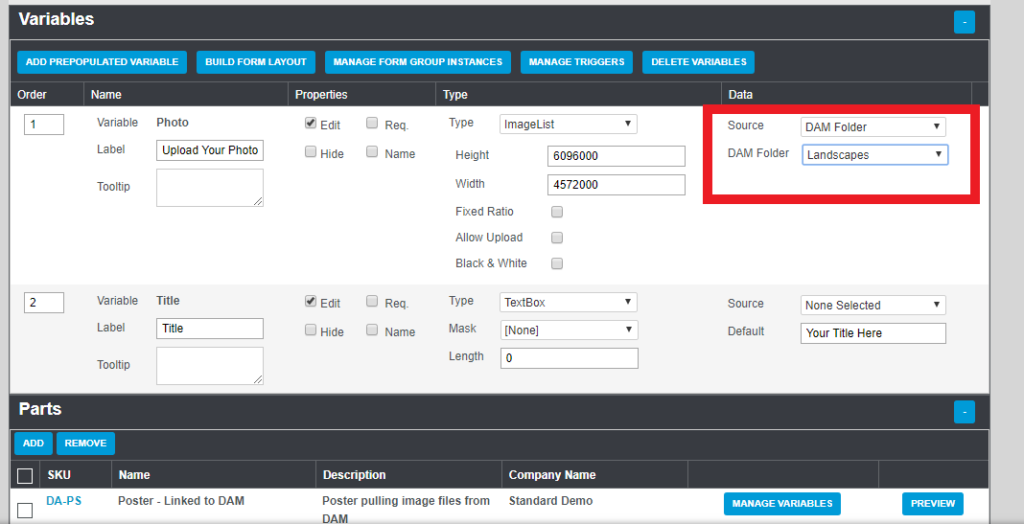
You’ll find DAM Folder as an option for data source types when in a soft proof project page. Go to Proofing > Soft Proof Projects. Select the proof project with the image variable you want to link a DAM folder to. Under the Type setting of the image variable, select ImageList. Then select DAM Folder under the Data Source dropdown. This will make a new dropdown appear that can be used to select a DAM folder.
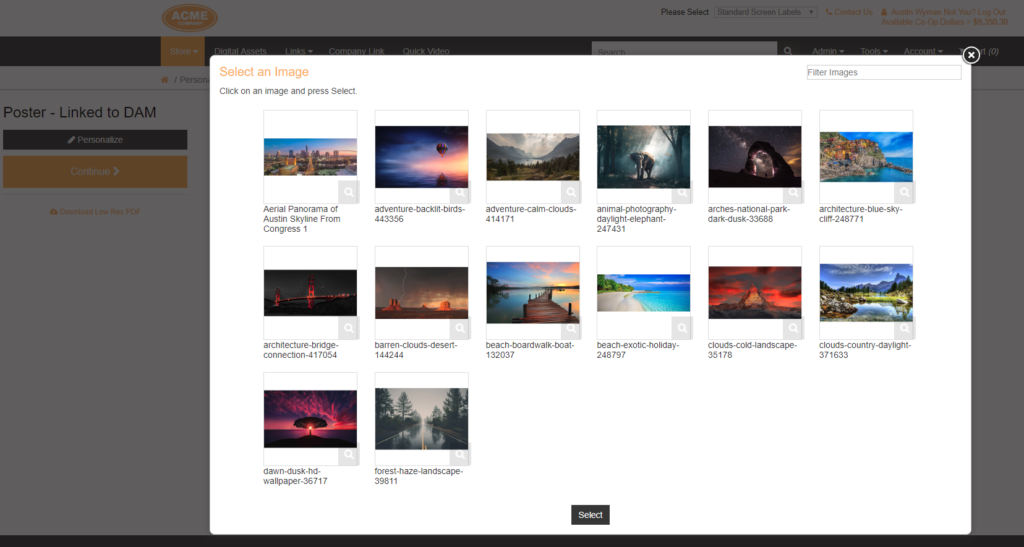
The workflow for an end user is simple. When a user is personalizing a part that has a DAM folder linked to an image variable, selecting the dropdown for that variable will pop open that folder as an image bank.
If you have any questions or need support, you can contact our support team at: [email protected]
Find all of our Did You Knows here: Knowledge Library