
Propago’s co-op funds system gives portal users a pre-funded balance they can apply toward orders — a powerful tool for clients who want to subsidize purchases for employees, franchise members, or other portal users. With the Default Initial Co-op Balance setting, you can now ensure that every new user who joins a specific user group automatically receives a co-op balance the moment their account is created or they are first assigned to that group.
This setting is configured at the user group level and works across every method of user creation: manual account setup, bulk user uploads, self-registration, welcome email invitations, and SSO. It also will trigger when a user who was previously created under a different user group is moved to the user group in question. The system keeps track of this to ensure a user only receives the default initial balance once, even if they are removed and later re-added to the same group.
Benefits to You
- Instant purchasing power for new users. New employees or organization members can begin ordering approved products immediately, without needing to wait for a manual co-op adjustment or use a personal payment method.
- Supports onboarding kits and employee essentials. Clients can pre-fund new users to cover items like welcome kits, branded apparel, or other onboarding materials.
- Introduces users to co-op. For clients new to co-op dollars, this is an easy way to get all portal users familiar with the feature — they’ll see their balance immediately upon first login and can begin using it right away.
How It Works
- In the back end, navigate to Portals and select a customer.
- Go to User Groups and select the user group you want to configure.
- Open the Settings tab for that user group.
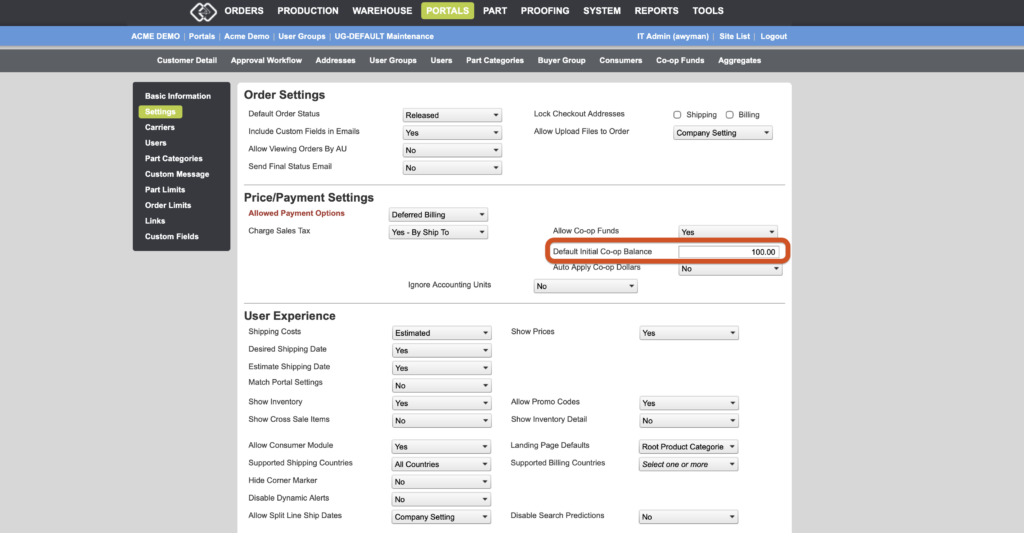
- In the Price/Payment Settings section, locate the setting called “Default Initial Co-op Balance”.
- Enter the amount of co-op funds you want new users in this group to receive automatically.
- Click Save.
From that point forward, any user who is newly created with that user group assigned — or who is moved into that user group for the first time — will automatically receive the specified co-op balance applied to their account.
If you have any questions or need support, contact our support team at [email protected].