

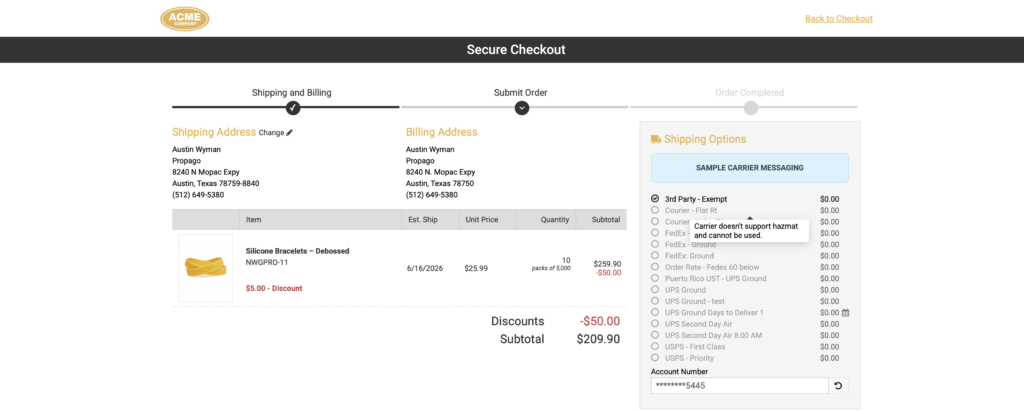
Shipping hazardous materials requires the right carrier — and now Propago makes sure users can only choose one. Two new settings work together to enforce hazmat-safe carrier selection automatically: a part-level Is Hazmat Item flag and a carrier-level Allow Hazmat flag. When a user’s cart contains a hazmat item, only carriers configured to accept hazardous materials will be available at checkout, with non-compliant carriers visibly disabled.
Benefits
- Prevent non-compliant shipments before they happen — hazmat items in the cart automatically restrict carrier selection to only those approved for hazardous materials, removing the risk of a user accidentally choosing an unsupported carrier.
- Clear error state when no valid carrier exists — if no available carrier supports hazmat shipping, the user is blocked from completing checkout and shown an explanatory message, preventing the order from being placed incorrectly.
- Configurable at both the part and carrier level — each setting is independent, giving you precise control over which products are flagged and which carriers are approved.
How It Works
Step 1: Flag a Part as a Hazmat Item
- In the back end, navigate to the part’s details page (Parts > Search > Select Part).
- Locate the new Is Hazmat Item setting.
- Set it to Yes.
- Save the part.
Step 2: Enable Hazmat Support on a Carrier
- Navigate to the carrier’s configuration page in the back end (Site > Carriers > Select Carrier).
- Locate the new Allow Hazmat setting.
- Set it to Yes for any carrier that is approved to ship hazardous materials.
- Save the carrier.
At Checkout
Once configured, the behavior at checkout is automatic:
- If a user’s cart contains any item with Is Hazmat Item set to Yes, only carriers with Allow Hazmat set to Yes will be available for selection.
- Carriers that do not support hazmat shipping will appear greyed out and cannot be selected.
- If no available carrier has hazmat support enabled, the user will be blocked from completing checkout and will see the message: “This order contains hazmat items, and no available carrier supports hazmat shipping.”
Important Notes
- Both settings default to No — no existing parts or carriers are affected until the settings are explicitly enabled.
- The hazmat carrier restriction applies to the checkout carrier selection screen only. Orders placed via API or order imports do not enforce the hazmat carrier settings.
- The restriction triggers if any single item in the cart is flagged as hazmat — the entire order’s carrier options will be filtered accordingly.
If your catalog includes any products classified as hazardous materials, this feature gives you a reliable way to enforce compliant shipping without relying on users to know which carriers are appropriate. Start by identifying the parts that need the Is Hazmat Item flag and confirming which of your carriers should have Allow Hazmat enabled.
If you have any questions or need support, you can contact our support team at: [email protected]
Find all of our Did You Knows here: Knowledge Library