

Report filters have always let you narrow results by entering a fixed value, like showing only parts with a quantity available over 100. Now, select fields support relative filtering, which lets you compare one column’s value directly against another column on the same report—no manual value entry required.
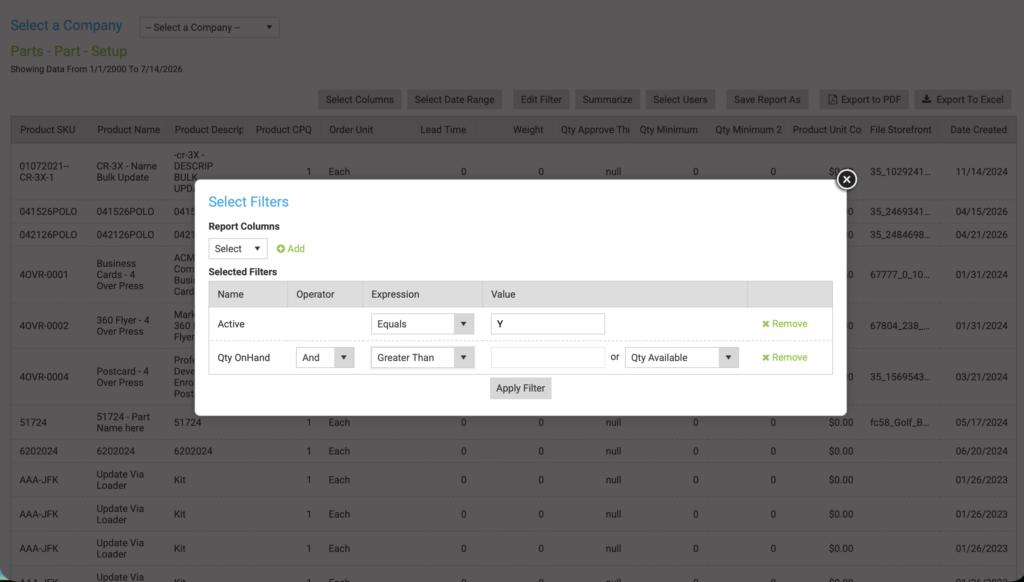
For example, instead of filtering Quantity On-Hand against a specific number, you can filter it against Quantity Available, Minimum Quantity, or Minimum Quantity 2. This makes it possible to answer questions that a fixed value never could, like which parts currently have less quantity available than their minimum quantity.
Benefits
- Catch inventory issues instantly by building filters like “Quantity Available less than Minimum Quantity” to surface parts that need reordering, without manually cross-referencing two columns yourself.
- Build smarter reports that stay accurate as your data changes, since the filter compares live values between columns rather than a value you’d have to update over time.
- No extra setup required—this filtering option simply appears within existing filter fields on supported columns.
How It Works
- Open a report and go to Edit Filter.
- Choose a supported column to filter on. Relative filtering is currently available on Quantity On-Hand, Quantity Available, Minimum Quantity, and Minimum Quantity 2.
- Choose your Expression (such as Equals, Greater Than, or Less Than) as usual.
- In the Value field, you’ll now see the option to select another column in addition to the option of typing in a fixed value. Choose from the other supported columns on that report.
- Click Apply Filter. The report will now filter by comparing the two columns’ live values using the expression you selected.
Important Notes
- This functionality is only available on a select set of quantity-related fields for now; more columns may be given this option in the future.
- The comparison column options shown will only include other fields on that same report that support relative filtering and share the same field type as your base column.
Want to learn more about reports in Propago? Check out our previous Did You Know articles:
- Did You Know You Can Choose What Column The Date Range Selector Will Filter By In Reports?
- Did You Know Dynamic Report Filters Can Be Used To Filter A Report Based On The Info Of The User Viewing The Report?
If you have any questions or need support, you can contact our support team at: [email protected]
Find all of our Did You Knows here: Knowledge Library