

Sometimes an order gets picked and lands in Awaiting Shipment, only for something to change — a shipping hold, a last-minute correction, or a picking mistake that needs to be undone. Until now, backing that order out meant manually adjusting inventory yourself. The new Return to Inventory action lets you unwind the pick with a single click, automatically restoring your inventory and sending the order back to be processed again.
Benefits
- Fix pick mistakes without manual inventory work. Reverse a pick and let Propago handle the inventory transaction for you — no more manually re-adding quantities to locations.
- Handle last-minute changes with confidence. Pull an order back before it ships, whether that’s for a customer request, a shipping hold, or a production issue.
- Trust your inventory counts. Returned materials go back to the exact locations they were picked from, so your on-hand quantities and locations stay accurate.
How It Works
- Go to Warehouse > Warehouse Window and open the Shipment Window.
- Find the order you need to unwind and click the Undo icon, located next to the Ship icon.
- A confirmation page appears, listing every picked item on the order — quantities, lot or custom identifiers, and the exact location each item needs to be returned to (matching the original pick task).
- Review the list and verify it against what’s physically been pulled. If you need a record for your team, print or screen capture this page now — once you confirm the return, this information is no longer available to view.
- Click Confirm Return to complete the return.
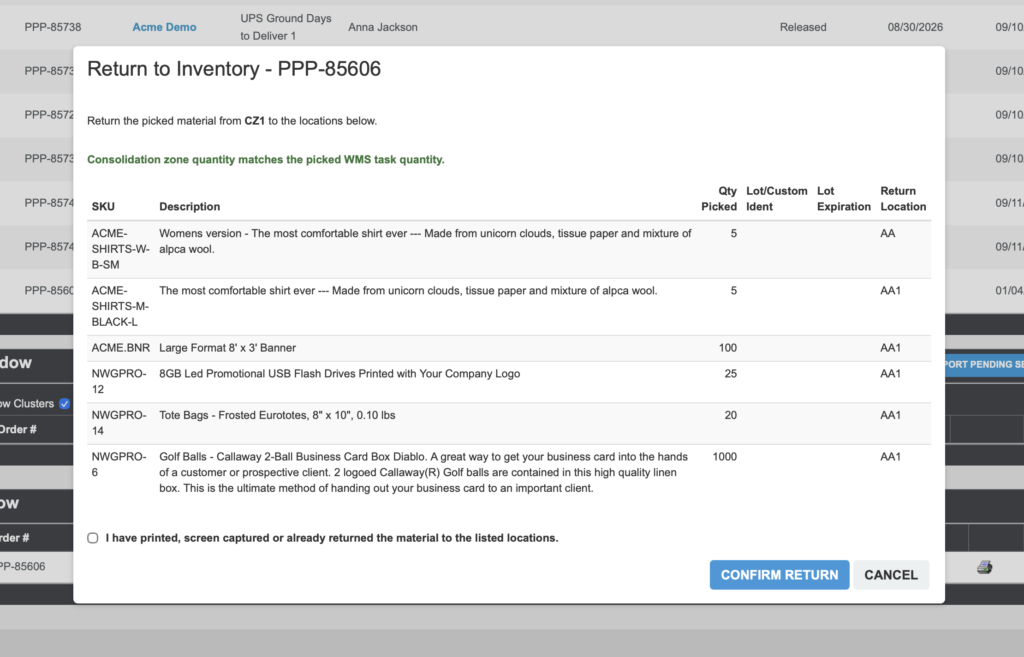
Once confirmed, Propago creates the inventory transaction that moves all picked materials back to their originating locations, and the order is set back to Released status — ready to be waved again from the beginning of the fulfillment process.
Important Notes
- Print or capture before you confirm. The picked-item detail (quantities, lot/custom identifiers, and return locations) is only shown on the confirmation page. Once you confirm the return, that information can’t be retrieved again.
- Confirming the return is final. It immediately reverses the pick transaction and resets the order to Released status.
Give Return to Inventory a try the next time a picked order needs to be pulled back before shipment.
If you have any questions or need support, you can contact our support team at: [email protected]
Find all of our Did You Knows here: Knowledge Library