

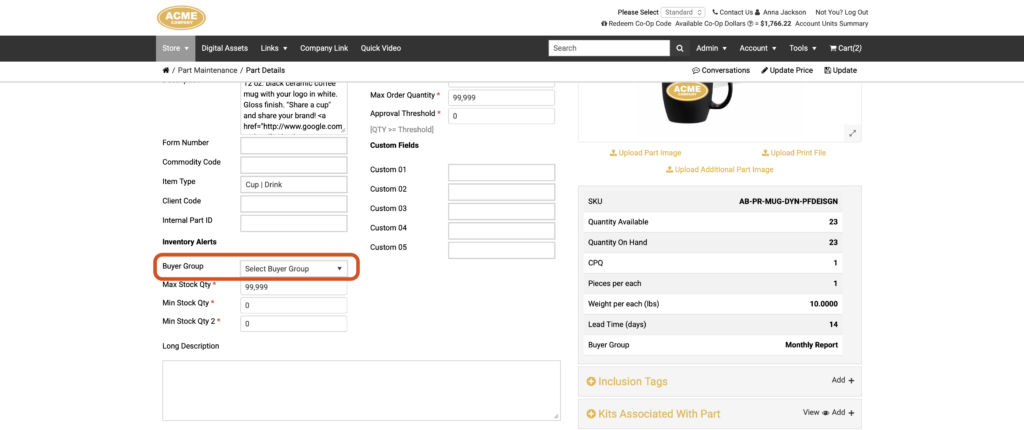
Managing which parts trigger inventory alerts for which users has always required a trip to the back end — until now. Front end admins can now assign a part to a Buyer Group directly from the part’s maintenance page on the storefront, making it easier to keep Buyer Group assignments up to date without needing back end access.
Benefits
- Give front end admins more control — the staff most familiar with day-to-day inventory needs can now manage Buyer Group assignments without waiting for back end access or support.
- Reduce back end dependencies — what previously required navigating to the back end portal settings can now be handled entirely from the front end admin view.
- Keep inventory alerts relevant — quickly reassign a part to the right Buyer Group as your product catalog or team structure evolves, right from the part’s details page.
- Visibility controlled at the portal level — if this capability isn’t appropriate for your front end admins, it can be hidden using a portal-level Display Options flag.
How It Works
- On the storefront, navigate to Admin > Parts.
- Search for the part you want to update and click on it to open its maintenance page.
- Scroll to the Inventory Alerts section.
- Locate the new Buyer Group dropdown. This dropdown lists all currently active Buyer Groups configured for the portal.
- Select the Buyer Group you want to assign this part to.
- Save your changes.
Once assigned, the part will be associated with the selected Buyer Group, meaning Buyer Group members will receive inventory alert emails for this part according to the Buyer Group’s email report settings.
Important Notes
- This feature can be hidden from front end admin part maintenance pages using a portal Display Options flag in the back end — useful if you want to restrict Buyer Group management to back end administrators only.
- Buyer Group setup — including creating groups, configuring users, and setting report frequency — is still managed in the back end at Portals > Select Customer > Buyer Group.
If your front end admins are actively managing inventory and keeping alert lists current, this update removes a common friction point from their workflow.
If you have any questions or need support, you can contact our support team at: [email protected]
Find all of our Did You Knows here: Knowledge Library