
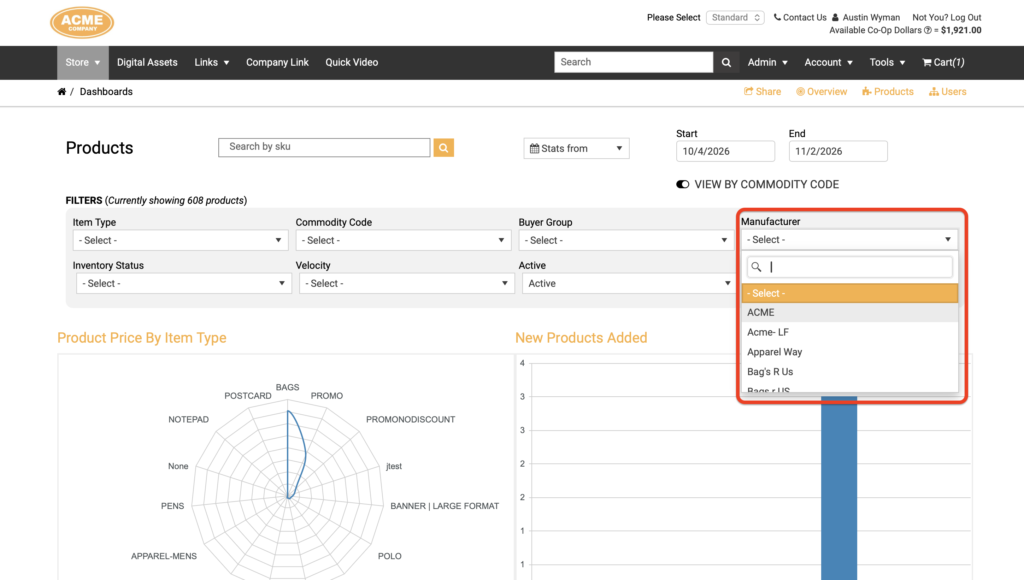
If your portal carries products from multiple manufacturers, you can now zero in on a single one without exporting data or building a report. The Products page of the front-end Dashboards includes a new searchable Manufacturer filter, so you can see product counts, charts, and drill-downs for just the manufacturer you care about.
The filter sits alongside the date, SKU, and other filters you already use, making it quick to answer questions like “How is this vendor’s product line performing?” right from the dashboard.
Benefits
- See one manufacturer at a time — narrow the entire Products dashboard to a single manufacturer with one selection.
- Find the right manufacturer quickly — the dropdown is searchable, so there’s no scrolling through a long list.
- Combine it with your existing filters — use it together with the date, SKU, and other filters to get as specific as you need.
How It Works
- In the front end of your portal, go to Admin > Dashboards.
- Open the Products page.
- In the Filters section, click the Manufacturer dropdown and type to search for, or scroll to select, a manufacturer.
- The dashboard updates to show only data for that manufacturer. Add any other filters, such as a date range or SKU, to narrow things further.
- To return to the full view, clear the Manufacturer selection to show all manufacturers.
Important Notes
- Available on shared Dashboards too. The Manufacturer filter works on both administrator Dashboards and Dashboards you’ve shared with non-admin users.
- The selection isn’t saved. The filter is a temporary view: Propago doesn’t save a default manufacturer, so you’ll start from all manufacturers each time you open the Products dashboard.
- Shared Dashboards can’t be locked to a manufacturer. If you’re sharing Dashboards with non-admin users, you can still lock them down by user, user group, buyer group, or commodity code, but not by manufacturer. Users viewing a shared Products dashboard can choose a manufacturer from the filter themselves.
Next time you want a quick look at a single manufacturer’s products, give the new filter a try. If you have questions, our Support team is happy to help.
Want to learn more about Dashboards in Propago? Check out our previous Did You Know articles:
- Did You Know Front-End Admins Can Give Non-Admin Users Access To Dashboards?
- Did You Know Front End Dashboards Have Been Updated With Improvements And New Charts?
If you have any questions or need support, you can contact our support team at: [email protected]
Find all of our Did You Knows here: Knowledge Library