

Ensuring that users enter correctly formatted account numbers and purchase order numbers at checkout has historically required workarounds or manual correction after the fact. The new Portal-Level RegEx Rules setting changes that by letting you define validation rules once — at the portal level — and have them enforced everywhere those fields appear across your portal, automatically.
Benefits
- Catch formatting errors before they cause problems — prevent incorrectly formatted third-party account numbers and PO numbers from making it into your orders in the first place.
- Set it once, enforce it everywhere — rules you configure at the portal level apply automatically wherever the corresponding field appears across the portal, so there’s no need to configure validation on a field-by-field basis.
- Guide users with clear, custom error messages — instead of a generic validation failure, you can write a message that tells users exactly what format is expected, reducing confusion and support requests.
- Full rule management in one place — view, edit, and delete your RegEx rules from a single settings page without digging through multiple configuration screens.
How It Works
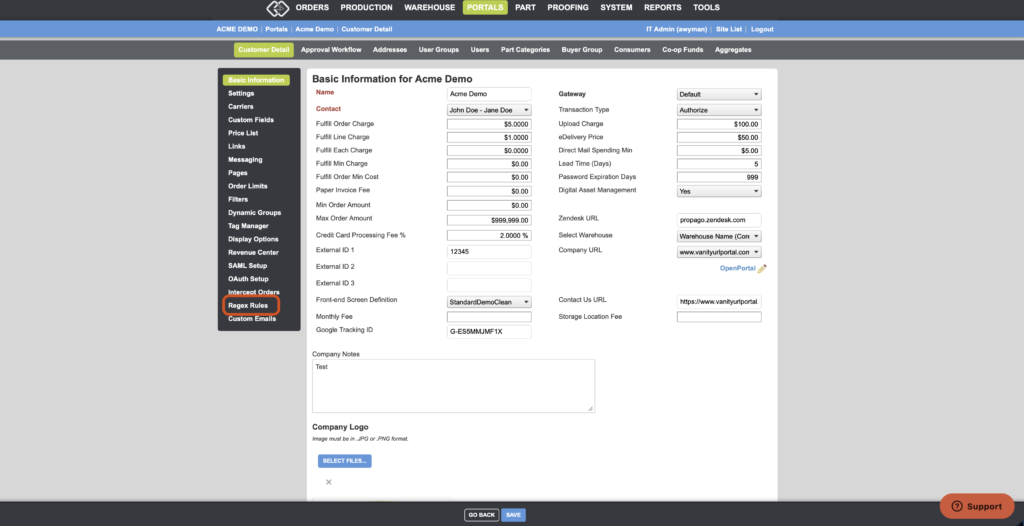
- In the back end, navigate to Portals and select a customer.
- Locate the new RegEx Rules section within the left-hand menu.
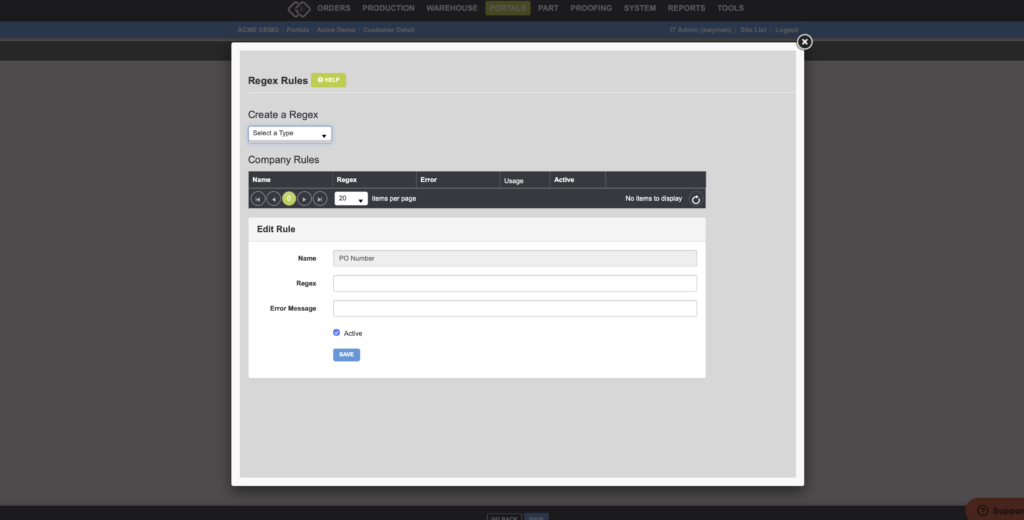
- Select the type of rule you want to create from the Create a Regex dropdown. Currently there are two options: PO Numbers and Third Party Account Numbers.
- Enter your RegEx expression that defines the valid format for that field.
- Optionally, enter an Error Message — this is the message users will see if they enter a value that doesn’t match the validation rule.
- Save the rule. It will be enforced everywhere that field appears on the portal.
To manage existing rules, return to the RegEx Rules settings page at any time to view, edit, or delete them.
Important Notes
- RegEx validation checks that a value matches the specified format — it does not verify that the account number or PO number is real or active.
- Rules apply portal-wide, so any rule you configure will be enforced across all areas of the portal where the corresponding field is used, including checkout.
- Currently, two field types support portal-level RegEx rules: Third Party Account Number and PO Number. Additional fields may be supported in the future.
If your portal relies on correctly formatted shipping account numbers or PO numbers to keep orders and fulfillment running smoothly, Portal-Level RegEx Rules give you a reliable way to enforce that at the source.
Want to learn more about related features in Propago? Check out our previous Did You Know articles:
- Did You Know You Can Now Make Third-Party Shipping Exemptions Conditional On Account Number Entry?
- Did You Know You Can Use The Purchase Order Workflow to Automatically Apply Purchase Orders To SKUs When Received?
- Did You Know You Can Use RegEx Validators To Validate User Inputs On Global Profiles?
If you have any questions or need support, you can contact our support team at: [email protected]
Find all of our Did You Knows here: Knowledge Library